Swing Trading AI Signal Generator
Advanced Swing Trading Signal Generator with Enhanced Data Analysis
Swing Trading AI Signal Generator

Read all the Details before using this Tool.
Imagine if you have a personal trading AI assistant who guides you in Swing trading when you have to buy or sell. Now it has come to your real life because we have brought to you a Swing Trading AI Signal Generator. If you are a beginner or advanced trader in the Swing options then don't worry because this Swing Trading Signal Generator tool is made for every type of trader.
This tool can turn complex market data into advanced mathematics calculations and tell you the strength of signal and many more things. And of course humans can't calculate these calculations by themselves and that's why we have made this Swing trading signal generator tool for you.
Key points to rememberHow to Use?
1. Price Data Section
In the Price Data Section, you have to enter the current candle price (Open, High, Low, Close) and volume.
2. Previous Price Data Section
In the Previous Price Data Section, you have to enter the previous candle price (Open, High, Low, Close) and Previous volume.
3. Technical Indicators Section
In the Technical Indicators Section, you have to enter the value of RSI, MACD line, MACD Signal line, ATR.
4. Previous Technical Indicators Section
In the Previous Technical Indicators Section, you have to enter the Previous candle value of RSI, MACD line, MACD Signal line.
5. MA & Bands Section
In the Moving Averages & Bands Section, you have to enter the value of EMA-10, EMA-50, Bollinger Top, Bollinger Bottom.
6. Previous MA & Bands Section
In the Previous Moving Averages & Bands Section, you have to enter the Previous candle value of EMA-10, EMA-50, Bollinger Top, Bollinger Bottom.
7. Execute Mathematics Calculation
After entering the data, hit the “Execute Mathematics Calculation” button. This Swing AI signal generator tool calculates advanced mathematics and gives you all the results.
🎯 How it works?
It is not a fancy chart or indicator tool, you only have to enter the necessary details of the current candle of any timeframe and the just previous candle data. After that hit the button and you will get the full data. It is not a magic tool for showing random data because it is based on mathematical calculations and you will know exactly why it is showing a BUY / SELL signal with percentage.
Six‑Point Signal Checklist:
Momentum (bullish or bearish price move)
Price vs. VWAP (above for buys, below for sells)
EMA slopes (rising EMAs hint at uptrends, falling EMAs signal downtrends)
MACD histogram direction.
Rate of Change (ROC) positivity or negativity.
All 5/6 or 6/6 requirements line up then you get a crystal‑clear BUY / SELL signal.
How to fill data fast?
1. You must think that it will take too much time to fill the data manually but here is a trick for you. You can use ChatGPT to get all the data and you have to only copy and paste in the tool. But it is recommended to use a desktop or laptop to use this tool and it will be easy for you to get the data and fill it fast.
2. So to get the data you have to use gocharting.com instead of Tradingview. Because Tradingview is a paid platform, where you have to pay if you are using more than two indicators. So Gocharting will be best for you. That's why make an account on this trading platform and add all the indicators that I have mentioned earlier.
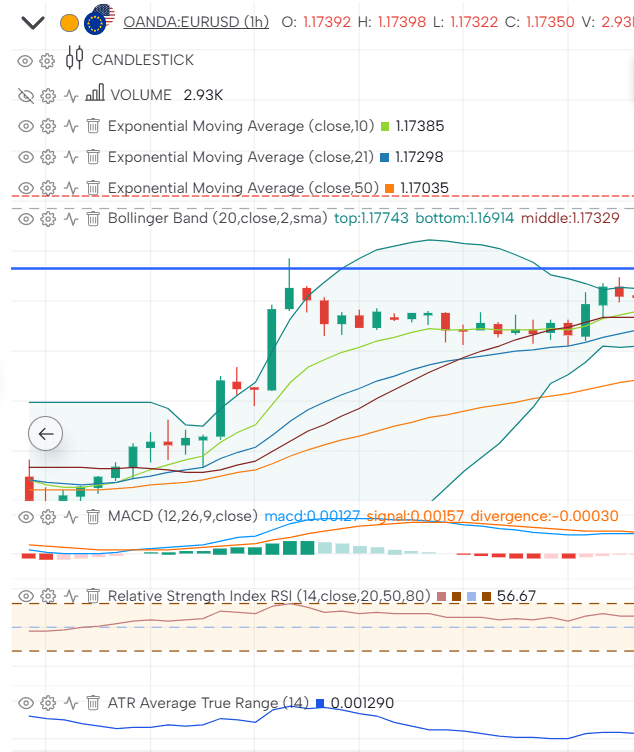
3. After making an account and adding all the necessary indicators, you can see on my screenshot image, you have to take a screenshot like this, where all the data of indicators is showing. To get the right data, you have to hover the mouse icon on the candle.
For example; hover the mouse on a 1 hour candle and you will see all the data according to that candle so take a screenshot of that. And do the same thing for the previous candle too. Simply add these screenshots in the ChatGPT and it will give you all the data in the list. Simply copy this prompt for ChatGPT.
🎯 Key points to remember
Volume value
Remember when you enter the value of Volume then it will show in the chart like this; 1,46k. Then you have to not enter the tool like 1,46k, instead you have to enter like this 1460.
Timeframe
This Swing Trading Signal Generator tool works in all the time frames but keeps time frame, 4 hour to 1 week timeframe. Higher timeframe will be good
BUY / SELL / No Signal
If you get the strength of result like this; 65% BUY & 35% SELL then you have to skip that signal and when you get the strength of result like this; 70% BUY & 30% SELL then go for it. Keep in mind that it should be 70% or 70%+ signal strength in percentage in both conditions BUY / SELL.
Why you will love it?
This tool is intended for informational and educational purposes only. It provides technical indicators and automated signals based on predefined conditions, but does not constitute financial, investment, or trading advice. The signals generated by this tool are based on historical and real-time market data, which can be volatile and unpredictable.
Users are solely responsible for any financial decisions made based on the tool’s output. We strongly recommend conducting your own research and consulting with a certified financial advisor before making any trading or investment decisions.
Past performance is not indicative of future results. Trading financial instruments, including forex, involves a high risk of loss and may not be suitable for all investors.
By using this tool, you acknowledge and agree that the developers and publishers of this tool are not liable for any losses, damages, or outcomes resulting from its use.